


Checkers Online
4.615.00K Reviews
App Specs
- Version
- 3.17.0
- Updated On
- License
- Free
- Downloads
- 100,000,000+
- Developer
- CC Games
- Categories
- Board
- Platform
- Android, iOS
Screenshots
 Analysis by AppCompare
I tend to judge a board-game app by how quickly it lets me get from a spare moment to a meaningful move. Checkers Online is built around a familiar game, so there is little to learn before play begins; the real question is whether its online and offline options suit the way you like to play. In my experience, it works best as an easy-to-pick-up checkers companion rather than a deep strategy platform, and that distinction matters if you are choosing between it and a more feature-heavy board-game app.
Quick sessions, with the usual online wait
A checkers board is naturally well suited to short visits: I can make a move, think through a reply, and return to the game when I have a little time. The app’s classic format keeps the basic interaction direct. Still, a match against another person depends on that opponent’s pace, so online play is not always as quick as a solo game or a board set up with someone beside you. If you have only a minute, a live match may be less convenient than playing offline; if you can settle in for a proper game, the human opponent is the more interesting choice.
That difference also helps set expectations. The game itself is simple to understand, but a close match can take patience because each move changes the board and invites a response. I would not open it expecting a rapid-fire arcade session. I would use it when I want a small strategic pause—on a break, while waiting for a meal, or at home when I have enough time to finish a game without rushing.
When the board gets busy
The app has two different kinds of heavier use: a longer run of play and the attention demanded by a competitive match. Checkers is not visually or mechanically complicated, which makes it comfortable for repeated sessions, but sustained play can still be mentally tiring. I find it useful to treat each game as a fresh problem rather than clicking through moves just to keep a streak of activity going. Taking a moment to scan the whole board before moving is more valuable than trying to play quickly.
For practice, a solo game is a sensible place to test an idea without the social pressure of an opponent waiting. I would use that setting to notice recurring mistakes—for example, moving a piece forward without checking what the reply opens up—then bring the lesson into a human match. The trade-off is that computer play can become predictable once you know the challenge level that suits you. Switching between solo practice and online opponents can keep the experience from feeling too repetitive.
Reliability and the shape of a match
Because online play involves another person, a pause does not necessarily mean the app has failed; the other player may simply be taking time to consider a move. I try not to judge reliability by one quiet moment in a match. When I want a game that does not depend on an opponent being available, I choose an offline option instead. That is a practical distinction for travel or for any situation where I would rather not rely on a live connection.
As with any online board game, a match is most enjoyable when both players can give it attention. Starting one just before a meeting or a commute ends can leave me watching the clock instead of thinking about the position. I get more from the online side when I begin at a time I can spare, and keep solo play for the gaps that may end unexpectedly. That simple choice makes the game feel more dependable in everyday use, even when the pace of a particular opponent varies.
Worth Reading Before You Choose

Baby Panda World Brings Quick Play to Modern Phones, but Its Game Library Feels Busy

ESPN’s Live Game View Makes Following Close Games Easier

QuizzLand Review: A Good Fit for Short Trivia Breaks, Not Every Player

Basketball Stars: Multiplayer Is Fast, but Can It Recover When Matches Go Wrong?

WEBTOON Turns Phone Updates Into a Better Reading Routine

Link to Windows Runs on Shared Habits, Not Social Feeds
What to expect from the device
Checkers is a lightweight kind of activity in the everyday sense: the board does not call for the visual complexity of a large action game, and the rules are familiar to many players. I would expect it to feel most at home on a phone where the board is easy to see and individual pieces are comfortable to select. On a smaller display, I would take an extra second before a move so I do not tap the wrong square. That is a usability consideration, not a reason to avoid the game.
The game is free to download, with optional in-app purchases listed from $0.99 to $49.99 per item. I would treat those purchases as a choice rather than a requirement for enjoying checkers, and check the purchase details carefully before confirming anything. It is rated for Everyone, which fits its accessible board-game premise, though parents should still make their own decision about online interaction and in-app spending. The current version is 3.17.0, and the minimum operating-system requirement is 7.0, so it is worth checking compatibility before installing on an older device.
Who gets the most out of it?
I would recommend this to someone who already enjoys checkers, a casual player who wants an opponent beyond the household, or a beginner who is willing to learn by playing. It is also a reasonable pick if you like switching between a quiet solo session and a more social match. If your main priority is a polished chess-style study environment, elaborate lessons, or a much broader selection of board games in one place, a dedicated alternative may fit better. This app’s appeal is its focus on checkers, not an attempt to cover every kind of tabletop play.
A useful everyday routine is to play a short solo game when you have an unpredictable wait, then save online matches for a calmer break. Before committing to a live game, consider whether you can stay available for its full length; if not, offline play is the lower-pressure option. For a shared game with a friend, it can also be easier to agree on a time first rather than assume both people will be ready at once. These small choices make the app more convenient without changing the simple appeal of the board.
Getting Started with Checkers Online
The first thing I noticed when I opened the Checkers Online app was its clean and intuitive interface. There's no clutter, just a straightforward menu that makes it easy to dive right into a game. Setting up an account was a breeze. You can either sign in as a guest or create an account to track your progress and stats. I opted for the latter because, let's face it, who doesn't love a little friendly competition?
Gameplay and Features
The gameplay itself is smooth and engaging. The app offers both single-player and multiplayer modes. If you're like me and love a good challenge, you'll appreciate the multiplayer option. You can play against friends or get matched with random opponents from around the world. It's like having a global checkers club in your pocket!
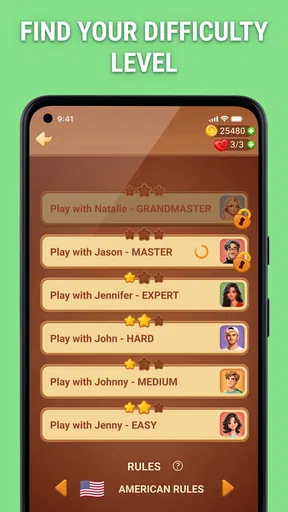
For those who are new to checkers or need a refresher, the app includes a handy tutorial. The AI opponents come in varying levels of difficulty, so you can hone your skills before taking on human players. I spent a good chunk of time playing against the AI, and I must say, the higher levels really put me to the test!
Design and User Experience
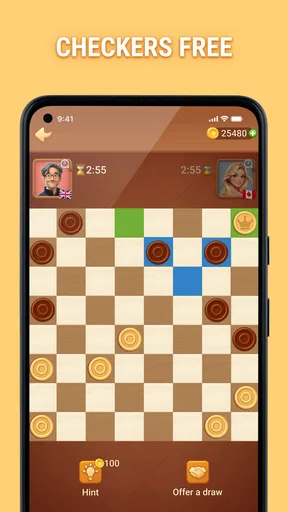
Visually, Checkers Online is pleasing without being overwhelming. The board and pieces are well-designed, making it easy to focus on your strategy. The app also offers several themes, so you can customize the look to suit your style. I particularly enjoyed the classic wood theme, which gave me all the nostalgic feels of playing checkers on a physical board.
Another cool feature is the chat option during multiplayer games. It’s a great way to connect with opponents, share a friendly banter, or even learn new strategies. Plus, the community seems pretty friendly, which is a bonus!
Why You Might Love It
If you're a fan of strategy games, Checkers Online is a must-try. It’s perfect for a quick game during your coffee break or a longer session when you’re lounging at home. The app’s ability to connect you with players worldwide keeps the game dynamic and interesting.
Another thing I appreciated was the absence of intrusive ads. While there are some, they don’t disrupt the flow of the game, which is a huge plus in my book. After all, nothing ruins a strategic move like a pop-up ad!
Final Thoughts
Overall, Checkers Online is a fantastic app for anyone who loves board games or wants to dip their toes into the world of checkers. It’s user-friendly, offers plenty of gameplay options, and connects you with a vibrant community of players. Whether you're a seasoned pro or a complete newbie, you'll find something to enjoy in this app.
So, if you’re looking for a fun and engaging way to pass the time, why not give Checkers Online a try? I promise you won't be disappointed. Happy gaming!
A familiar game with a large audience
Checkers is one of those games where the rules are easier to pick up than the consequences of a move. That makes this a friendly starting point for someone who wants a board game without a long rules introduction, but it also means experienced players can quickly focus on positioning, exchanges, and planning several turns ahead. I would approach it as a straightforward way to play the classic game, not as a substitute for a specialist training tool.
CC Games is the developer, and the game has a 4.6 average from around 1.5 million ratings, alongside about 15,000 written reviews. It has passed 100 million installs, which suggests that finding other people familiar with the format is part of its broad appeal. Those figures are useful context, but they do not guarantee that every opponent will match your preferred pace or skill level; I would still choose the mode that suits the moment.
Small habits that improve a match
One practical habit is to pause before every capture and check what the move leaves exposed. Captures can look immediately attractive, yet the next reply may create a worse position. The same scan helps beginners avoid moving a piece simply because it is available. I find that slowing down for a few seconds often makes a casual game more satisfying than trying to win by tapping quickly.
When practicing against the computer, I would vary the difficulty only after I can explain why I lost a game at the current level. Otherwise, raising the challenge can turn practice into repeated frustration rather than useful feedback. Conversely, staying at an easy level indefinitely may make online opponents feel unexpectedly difficult. The most useful middle ground is to treat solo play as a place to test decisions, then use human games to see how another person responds.
The online chat can add warmth, but it is not essential to the board itself. If I want a quiet, focused match, I can keep my attention on the position rather than feeling obliged to chat. If friendly conversation is part of the fun, a brief, good-natured exchange can make a match feel less anonymous. I would avoid sharing personal details with strangers and remember that a board-game chat is still an interaction with people I do not know.
Choosing between this and other ways to play
Compared with a physical board, the app removes the need to find a partner in the same room and can put me against a computer when nobody is available. The physical version still wins for a family table or a relaxed game where conversation matters more than matching with strangers. Compared with a general board-game collection, this one is more appealing if checkers is the game I actually want to play; a bundle is a better choice if I want to switch among several games without installing separate apps.
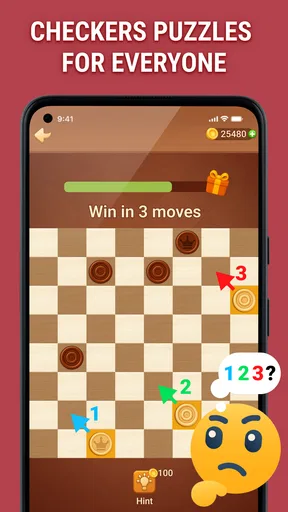
It also differs from puzzle-focused strategy apps. Here, the draw is playing full games, including against other people, rather than working through a curated sequence of isolated positions. Someone trying to study checkers seriously may prefer a tool organized around lessons and analysis. For a casual player, though, alternating between the tutorial, computer opponents, and online matches offers a more approachable route into the game than starting with dense theory.
Cost, age suitability, and expectations
The game is free, while optional in-app purchases range from $0.99 to $49.99 per item. I would not assume that spending is needed to enjoy a standard match; instead, review each item in the purchase flow and make sure it is something you actually want. The Everyone age rating reflects the accessible board-game format, but families may still want to talk about online chat and set appropriate limits for purchases, especially when a child uses a shared device.
Its release date is January 5, 2015, and the current version is 3.17.0. The minimum operating-system requirement is 7.0. That gives people with older compatible devices a reason to check the system requirement before downloading, while anyone on a newer phone should still consider screen comfort: a board that feels clear at a glance makes it easier to concentrate on tactics. I would also keep the app updated through the device’s usual store process rather than relying on assumptions about how a particular installation behaves.
My performance verdict
For a simple board game, the main performance test is whether the board stays easy to read and the move-by-move rhythm lets me think. I find the uncomplicated presentation better suited to that purpose than an interface crowded with unrelated options. Online pacing remains the biggest variable: my experience of a match can depend more on the other player’s response time than on the game’s basic mechanics. When I need certainty, I choose solo play; when I want the unpredictability of a real opponent, I go online.
I would recommend it to a checkers fan who wants a convenient mix of computer practice and human competition, and to a newcomer who is happy to learn by trying moves. I would steer away anyone who needs a guaranteed short session, dislikes online interaction, or expects advanced analysis and a wide catalogue of games. For me, the strongest reason to install it is simple: it makes a familiar board game easy to pick up in different situations, while leaving the choice between quiet practice and a social match in my hands.
Pros
- Easy-to-navigate interface for all ages.
- Multiplayer mode with global opponents.
- Customizable board and piece designs.
- Smooth and responsive gameplay.
- Regular updates with new features.
Cons
- Requires constant internet connection.
- Limited offline play options.
- Ads can be intrusive during matches.
- Some features locked behind paywall.
- Occasional connectivity issues.
FAQs for Checkers Online
What features does Checkers Online offer?
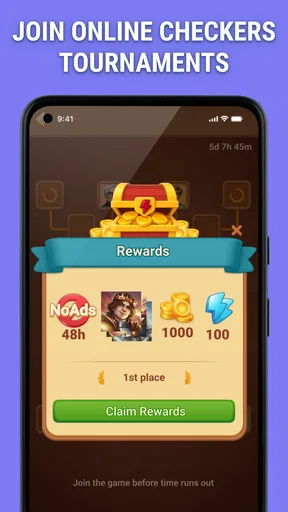
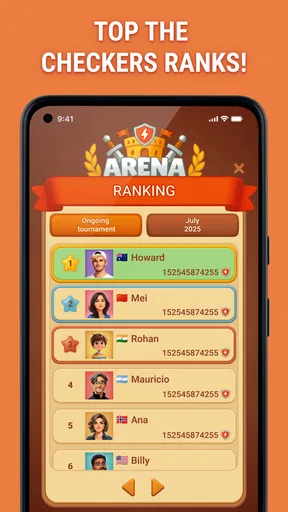
Checkers Online provides a variety of features to enhance your gaming experience. It includes multiple difficulty levels, an online multiplayer mode, and customizable board designs. Additionally, the app offers a chat feature to communicate with opponents, and leaderboards to track your progress and compete globally.
Is Checkers Online free to play?
Yes, Checkers Online is free to download and play. However, it may offer in-app purchases for additional features such as ad-free gaming or exclusive board designs. These purchases are optional and do not hinder the basic gameplay experience.
Can I play Checkers Online offline?
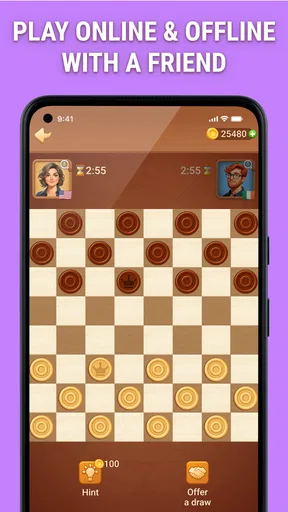
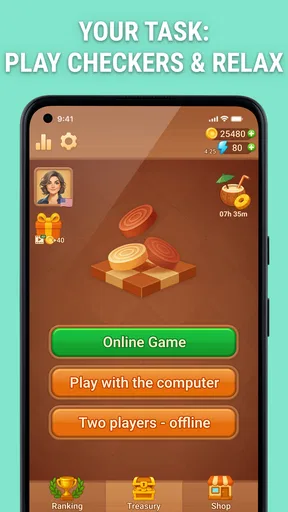
Checkers Online offers both online and offline modes. You can enjoy playing against AI opponents in offline mode, which is perfect for practice or when you don't have an internet connection. The online mode allows you to challenge friends or random players around the world.
How does the multiplayer mode work in Checkers Online?
In multiplayer mode, you can play against friends by inviting them through the app, or compete with random players globally. The app uses matchmaking algorithms to pair you with players of similar skill levels, ensuring a fair and competitive gaming experience.
What platforms is Checkers Online available on?
Checkers Online is available on both Android and iOS platforms. You can download it from the Google Play Store for Android devices and the Apple App Store for iOS devices. Ensure your device meets the minimum operating system requirements for smooth gameplay.


